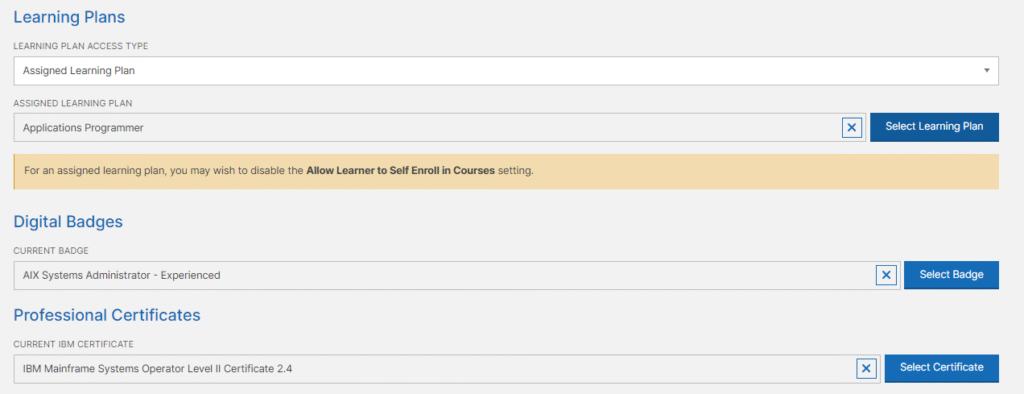
Company Administrators can assign learners specific learning plans, badges and professional certificates in bulk or individually. Please note that learners can change Badge and Certificate assignments at any time. Portfolio assignments can be restricted to a learner by selecting the Assigned Portfolio option in the learner’s profile page. If this option is not set, the learner can change their learning plan assignment.
Assigning Portfolios, Badges and Professional Certificates to Learners in Bulk
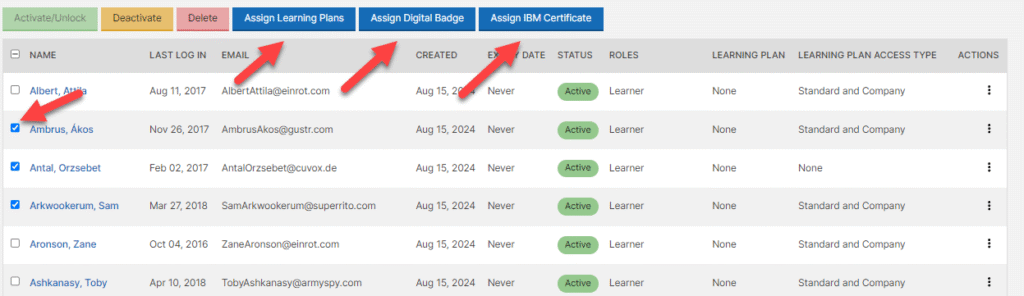
For bulk assigning, simply use the checkbox next to the learners you wish to assign and use the Assign Buttons at the top of the Manage Users page. See sample image below.
Assigning Portfolios, Badges and Professional Certificates to Learners Individually
To assign a Portfolio, Badge or Professional Certificate to an individual learner, access the learner’s profile page and set the section Portfolios, Digital Badges and Professional Certificates area and select one. Please note that learners can change Badge and Certificate assignments at any time. Portfolio assignments can be restricted to a learner by selecting the Assigned Portfolio option in the learners profile page. If this option is not set, the learner can change their learning plan assignment.